For anyone interested in joining our test today at
1pm Eastern of Live Play using TeamViewer, here are some instructions:
Join the meeting by clicking on this link:
http://go.teamviewer.com/v8/m73174874
Your browser will prompt you to either Run, or Save then Run (depending on your browser) the TeamViewer connection utility. If your Security software warns you about the file you are running or downloading, just accept it and let it run or download.
You will automatically be taken to the meeting room. If the meeting has not yet started, you will get a waiting page, otherwise you will simply join the meeting in progress.
A TeamViewer
Control Panel will appear on the right side of your screen.
To hear the meeting audio, click the 'headphones' icon and the
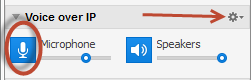
Voice over IP section in the Control Panel will expand.

If you want to speak in the meeting, click on the
microphone icon in that section to
un-mute it. You may need to check your
audio settings to make sure you have the correct microphone and speakers identified for TeamViewer to use. Click the 'gear' icon at the right side of the
Voice over IP section.

If you can't hear or can't speak (i.e. the group seems to not hear you), you can send a
text chat message and I'll try to respond. To chat, click the 'chat icon' at the top, which opens the
Chat section of the Control Panel, then type a message.

FWIW, I recommend folks do not enable video for this test session - it eats up a certain amount of bandwidth which I'd prefer we reserve for audio and screen sharing.
I will use my screen to display RDSS and whatever else we need, and perhaps hand the controls over to other presenters if they wish to make points from their own screens.
I'd like to participate for about
an hour and see what happens.
Again, this is just a test session today and we may or may not get much useful handicapping or betting done. But it might be a useful dry run for folks to do Live Sessions like this whenever they want, and it will help me better understand how to set up online RDSS Learning sessions in the near future.
Good luck to us - see, and hear, you all this afternoon!
Ted